HomePlugable dock mac monitors
Express Delivery
Price (₦)
-
Discount Percentage
Brand
Plugable dock mac monitors
(65 products found)
Discover the ultimate solution for enhancing your Mac experience with plugable docks for monitors. Our expertly curated selection offers seamless connectivity, allowing you to expand your workspace effortlessly. Elevate productivity and enjoy stunning visuals with reliable plugable docks designed specifically for Mac users. Explore our range today for a superior multi-monitor setup.


Out of Stock
Microsoft Surface Dock PD9-00003 Docking Station
₦ 251,900
₦ 298,900
-16%


VGA /SVGA 15pin Gender Changer Adapter Female To Female Cable Extender Connector
5 (5)
₦ 3,999
₦ 4,000
-1%
More Variants Available


Ugreen Revodok Pro 312 12 in 1 USB C Docking Station
₦ 114,000
₦ 130,000
-12%
Low Stock


USB C to Mini DisplayPort Cable
₦ 13,899
Low Stock


Mini DisplayPort To HDMI Adapter Mini DP Male To HDMI Female Thunderbolt 2.0 To HDMI Adapter For Apple MacBook Pro Air, Micro.soft Surface Pro 4 Pro 3, Google Chromebook, Monitor, Projector Etc.(White) BDZ
4.7 (10)
₦ 6,500
₦ 7,000
-7%


Type USB TypeC Hub Hdmi RJ45 DOCK Adapter 6in1 Docking Station LAN
₦ 18,899
Low Stock


Usb-c To Usb Adapter
₦ 14,500
Low Stock

8 In 1 Type C Multifunction Adapter
₦ 30,000
₦ 35,000
-14%

Mini Display Port To HDMI Adapter
4.5 (8)
₦ 4,999

Mini Display Port to HDMI + VGA + DVI Adapter Cable
5 (1)
₦ 9,999


V2COM Z2 Portable Triple Monitor For Laptop, 15.6" Inch Ips Fhd Display & Plug-and-play
₦ 1,000,000
Low Stock

Out of Stock
Rankie Mini DP To HDMI DisplayPort 6ft
₦ 8,000


7-in-1 Computer Multi-function Multi-port Docking Station USB Hub
4.2 (29)
₦ 6,430
₦ 10,000
-36%
Jumia Express

Multifunction 11 in 1 HUB USB C Multiport Adapter Hdtv 4k 4 USB 3.0 Hub 3.5mm AUX 11 Port Dock Station For Laptop Splitter
₦ 34,999
Low Stock

12-in-1 Usb C Hub / Docking Station - Triple Display Type-c Adapter
₦ 54,999

Mini Display Port To HDMI Adapter
₦ 7,000


Mini Display Port To VGA/HDMI/DVI Adapter-Apple Enable
₦ 15,000
offers from


DELL WD19S Docking Station 130W Docking Station
₦ 420,000
Low Stock


DELL Pro P 34 USB-C Hub Conferencing Monitor - P3426WEB
₦ 1,439,880
Low Stock


Ugreen USB C Hub 5 in 1 Multiport Adapter Revodok 4K HDMI, 100W Power Delivery, 3 USB-A Data Ports, USB C Dongle for MacBook Pro/Air, iPad Pro, iMac, iPhone 16 Pro/Pro Max, XPS, Thinkpad
5 (1)
₦ 158,000
Low Stock

Mini Display Port To Type-c
₦ 16,500


Type-C To HDTV 12 In 1
₦ 54,000
₦ 55,000
-2%


Hp Series 7 Pro 34-inch WQHD Curved HDR Conferencing Monitor - 8K157UT
₦ 1,800,000
offers from
Low Stock


Mini DisplayPort To HDMI Adapter Mini DP Male To HDMI Female Thunderbolt 2.0 To HDMI Adapter For MacBook Pro Air, Msoft Surface Pro 4 Pro 3, Google Chromebook, Monitor, Projector Etc.(White) BDZ
3 (1)
₦ 6,000


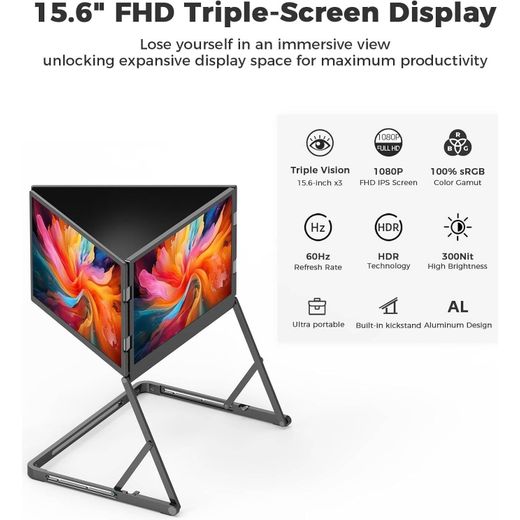

V2COM Q1 Quad Triple Laptop Monitor Extender 15.6" FHD 1080P IPS Portable Screen with HDR, 180° Rotation
₦ 1,200,000
Low Stock
Frequently Asked Questions about plugable dock mac monitors
How do I choose the right plugable dock mac monitors for my Mac setup?
Start by listing how many displays you need and which connections your monitors use, such as HDMI, DisplayPort, or VGA. Match those outputs to a dock that supports the same ports and a compatible Mac interface (USB-C or Thunderbolt). Consider whether you want to power your MacBook through the dock with PD charging and whether you need USB ports for peripherals. For best results, pick a multi-port hub or adapter designed to work with MacBooks and Mac desktops in this category.
What is the most important detail when evaluating a plugable dock mac monitors, especially the video output options?
Choose a solution that provides the exact video outputs you need (for example, HDMI, DisplayPort, or VGA) and supports the number of displays you intend to run. Verify compatibility with your Mac model and macOS version, and ensure the dock can drive multiple monitors at the required resolutions. If you want to keep your laptop charged while connected, look for 100W PD charging support. By prioritizing output variety and compatibility, you’ll avoid buying a dock that can’t handle your display needs.
What setup works best for a beginner versus a pro user with plugable dock mac monitors?
For a beginner, a simple generic USB-C hub with one or two displays is usually enough to extend a desktop workspace. For a pro user who needs three displays, choose a multi-monitor dock (such as an 8-in-1 hub or a hub offering dual HDMI, DisplayPort, and VGA) that can drive all screens simultaneously. Ensure the dock supports your Mac’s port type and your preferred resolutions. This category includes both compact adapters for single monitors and robust hubs for advanced multi-monitor work.
How should I maintain and ensure compatibility when using plugable dock mac monitors with different Mac models?
Keep connectors clean and use cables appropriate for the ports on the dock and your monitors. Regularly check for macOS updates and firmware compatibility on the dock, and verify that power delivery and display standards stay consistent across devices. When in doubt, start with a dock known to work with MacBook and Mac desktops, and test one monitor at a time before expanding to multiple displays. This helps prevent compatibility issues and disconnects.
Which products in this listing best match plugable dock mac monitors for a multi-monitor setup?
A generic USB C docking station that offers dual HDMI along with DisplayPort or VGA is ideal for a three-monitor Mac setup, especially when it includes 100W PD charging. An 8-in-1 generic USB C hub with multiple outputs is a great choice if you need additional USB ports alongside video. For lighter needs, Thunderbolt Mini DisplayPort to VGA adapters provide a reliable extra display for MacBook users. These options align with the plugable dock mac monitors category while offering flexibility for different workspace needs.
What should I verify before buying a plugable dock mac monitors to ensure macOS compatibility, power delivery, and display standards?
Check that the dock supports your macOS version and uses a compatible interface (USB-C or Thunderbolt) for your Mac. Confirm the exact outputs you require (HDMI, DisplayPort, VGA) and the number of displays it can drive, plus whether 100W PD charging is available to power your MacBook. Review any notes about supported resolutions and monitor compatibility to avoid surprises. This helps you pick a plugable dock mac monitors that truly fits your setup.