HomeEasy setup router
Express Delivery
Price (₦)
-
Discount Percentage
Brand
Easy setup router
(97 products found)
Discover the convenience of an easy setup router, designed to simplify your internet experience. With user-friendly interfaces and quick installation processes, these routers ensure seamless connectivity for all your devices. Explore our top picks to enhance your home or office network effortlessly, without the hassle of complicated configurations.


TP-Link 300mbps Wireless N Router TL-WR840N
₦ 35,000


TP-Link TL-WR841N 300Mbps Wireless N Router
₦ 61,000
Low Stock


TPLink AC750 Dual Band Wireless Router - Archer C20, High-Speed Wi-Fi For Home & Office
₦ 44,000
₦ 47,000
-6%


Out of Stock
Mtng Universal Mtng Cat4 Mtng 4G Wireless Wifi Router T30D + Free 50GB Data On Activation + Router Power Bank
₦ 45,000
₦ 50,000
-10%

Mtng M.tng 5G Ultrafast Router ZLT X100M PRO + BATTRY BACKUP
₦ 110,000

Out of Stock
Mtng ZTE 5G Ultrafast Router plus BATTRY BACKUP
₦ 120,000

Mtng 5G ULTRA FAST BROADBAND ROUTER + 100GB Data Bonu On Activation plus power bank backup
₦ 198,000
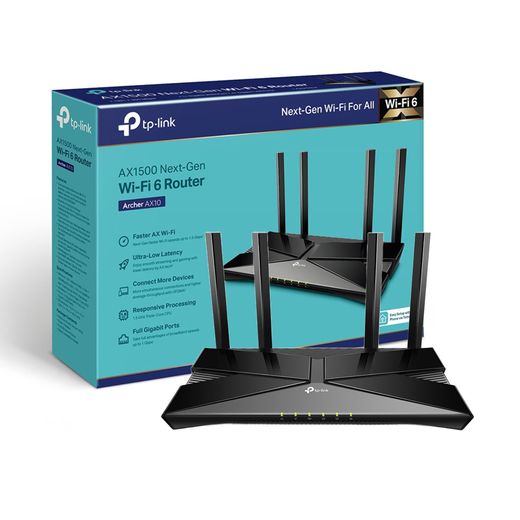
TP-Link Archer AX10 AX1500 Next-Gen Wifi 6 Router
₦ 110,000

Mtng Mtńg 5G Wi-Fi Broadband Router Hotspot + BACKUP POWER BANK + Free 100gb On Activation (5G)
₦ 178,600
₦ 188,000
-5%


TP Link Archer C64 AC1200 Dual-Band Gigabit Wi-Fi Router
4.7 (3)
₦ 59,000
₦ 65,000
-9%


Mtng 5G ULTRA HIGH SPEED BROADBAND+DATA SIM+ Powerbank Inside
3.8 (9)
₦ 78,000
₦ 130,000
-40%
Low Stock


Out of Stock
ZLT UNIVERSAL Mtng 4G Wireless Wifi Router T30D + Free 50GB Data On Activation + Router Power Bank
₦ 32,000
₦ 39,999
-20%


Universal Usb 4G LTE Wifi Hotspot Modem ALL NETWORK
5 (1)
₦ 19,899
Low Stock


4G5G Portable WiFi 10000mAh Power Bank Router
3.3 (3)
₦ 48,450
₦ 70,000
-31%

Mtng Mtń Ops 5G ULTRA FAST BROADBAND ROUTER + 1OOGB Data Bonu On Activation
₦ 185,000
Low Stock


Mtng ZTE Mtng 4G Wireless Router MF293N + Free 50GB Data Sim Card Without Power Bank
3.4 (7)
₦ 25,000


TP-Link 300mbps Wireless N Router TL-WR840N
₦ 35,000
Frequently Asked Questions About easy setup router
How do I choose the right easy setup router for my home or small office?
Start by evaluating space, devices, and online activities to pick the right easy setup router category. For homes with multiple devices, look for dual‑band models with strong coverage and multiple antennas, such as options in the OLAX, MTNG, or generic high‑speed lines. If you need fast streaming or gaming, prioritize models offering higher combined speeds and a simple app‑based setup. Finally, ensure compatibility with your internet service and confirm the device supports quick‑start setup to get online quickly.
What does the most complex attribute—like dual‑band throughput and antenna count—actually mean for an easy setup router?
The most complex attribute—dual‑band throughput and antenna count—determines how far your signal travels and how many devices can perform well at the same time. The 2.4GHz band provides longer reach but slower speeds, while the 5GHz band offers higher speeds with shorter reach, so a good balance supports both basic tasks and demanding apps. A higher combined speed (for example, 1200Mbps) is a theoretical maximum; real‑world speeds depend on layout, walls, and interference. More external antennas can help, but optimal placement and router design matter just as much for real performance.
Which usage scenario fits best: a beginner user at home or a power user with gaming and streaming needs?
For beginners, choose an easy setup router with a straightforward app, automatic network optimization, and simple guest networking. For gamers or heavy streamers, prioritize reliable dual‑band or AX support, QoS features, and higher sustained speeds to keep games and 4K streams smooth. In both cases, use a central, unobstructed location and enable basic security in the setup app. The right choice balances ease of setup with the performance your activities require.
What maintenance and compatibility steps should I follow for an easy setup router?
Ensure the router is compatible with your internet type (cable, fiber, or DSL) and your modem, then use the manufacturer’s app to complete the setup. Regular firmware updates improve security and performance, so check for updates every few weeks. Place the router in a central, elevated spot away from thick walls, and keep it clean and dust‑free; unplug before any physical cleaning. Use standard features like 2.4/5GHz support and a guest network to maintain a stable, safe home network.
Which brands or series in our easy setup router range are best for new buyers?
Look for well‑established brands known for reliable easy setup experiences, such as OLAX and MTNG, along with solid generic dual‑band options. These lines typically offer simple, app‑guided setup, clear security defaults, and good coverage for typical homes. If you have a larger space, consider models with more antennas or better range, and rely on the same easy setup process to configure QoS and guest networks. Start with a trusted brand to ensure ongoing firmware support and straightforward maintenance.