
HomeHome & OfficeOffice ProductsOffice ElectronicsScanners & AccessoriesAccessoriesScanner Pad AssembliesTDW5P V9XD7 Battery for Alienware 13 R3 (15.2V 76Wh)
/product/07/0222024/1.jpg?3215)
/product/07/0222024/2.jpg?3215)
/product/07/0222024/3.jpg?3215)
/product/07/0222024/4.jpg?3215)
/product/07/0222024/5.jpg?3215)
/product/07/0222024/6.jpg?3215)
/product/07/0222024/7.jpg?3215)
/product/07/0222024/8.jpg?3215)
Share this product
Brand: DELL | Similar products from DELL
₦ 85,000
₦ 95,00011%
In stock
+ shipping from ₦ 750 to LEKKI-AJAH (SANGOTEDO)
0 out of 5
(No ratings available)Variation available
Promotions
Delivery & Returns
Choose your location
Pickup Station
Delivery Fees ₦ 750
Ready for pickup between 22 October and 23 October if you place your order within the next 12hrs 7mins
Door Delivery
Delivery Fees ₦ 1,550
Ready for delivery between 22 October and 23 October if you place your order within the next 12hrs 7mins
Return Policy
Free return within 7 days for ALL eligible itemsDetails
Seller Information
DataSys
64%Seller Score
67 Followers
Seller Performance
Shipping speed: Good
Quality Score: Poor
Customer Rating: Average
Cancellation Rate: Average
Product details
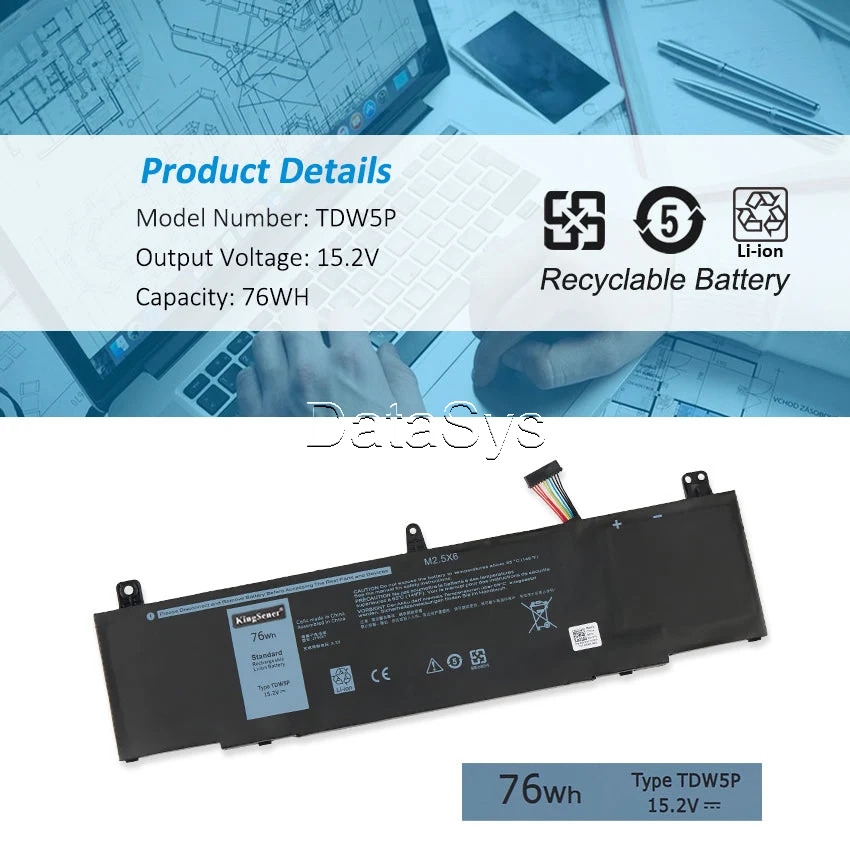
Replacement Battery Specification:
Battery model: TDW5P / V9XD7 / 0V9XD7 / 4RRR3 / 04RRR3 / JFWX7 / 0JFWX7
Voltage: 15.2V
Capacity: 76Wh
Battery Type: Li-ion
Cell; 6 Cell
Color: Black
Condition: Original Replacement Battery (100% New)
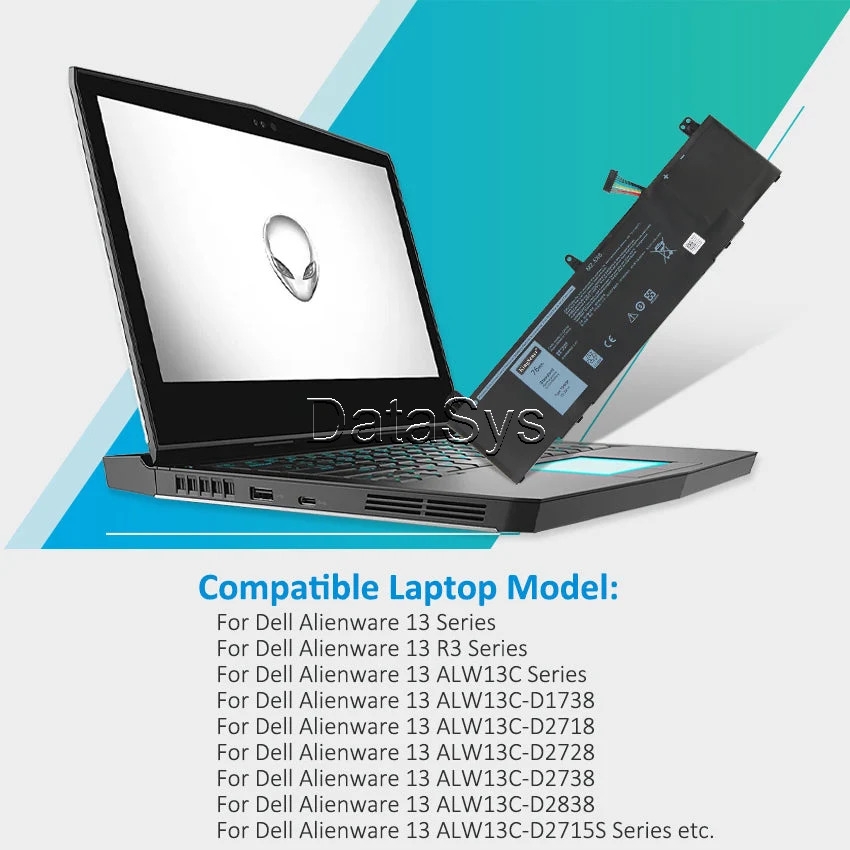
Compatible Laptop Models
- For Dell Alienware 13 R3
- For Dell Alienware 13 ALW13C
- For Dell Alienware 13 ALW13C-D1738
- For Dell Alienware 13 ALW13C-D2718
- For Dell Alienware 13 ALW13C-D2728
- For Dell Alienware 13 ALW13C-D2738
- For Dell Alienware 13 ALW13C-D2838
- For Dell Alienware 13 ALW13C-D2508
- For Dell Alienware 13 ALW13C-D2503S
- For Dell Alienware 13 ALW13C-D2506S
- For Dell Alienware 13 ALW13C-D2715S
Compatible Replacement Part Numbers: TDW5P / V9XD7 / 0V9XD7 / 4RRR3 / 04RRR3 / JFWX7 / 0JFWX7
Compatibility Note;
Q: Is TDW5P compatible with Alienware 13 R1 or R2?
No. The TDW5P (15.2V, 76Wh) is designed specifically for the Alienware 13 R3 (ALW13C series). The Alienware 13 R2 uses the YRDD6 and earlier R1 models use a different connector and voltage.
WARNING! Always verify the battery label on your existing pack before ordering.
Why Choose This Battery
The Li-ion cells deliver reliable 76Wh power for demanding gaming sessions. Built-in BMS protects against overcharge and short circuits. Plug-and-play installation with no modifications required
Notice: Not all compatible laptop models are listed or included here.
You can open the back of your laptop to check the original battery model number.
WARNING! Always confirm the original Computer model/part number printed on your existing battery before ordering.
WARNING! Please check the Picture of your original laptop battery model and confirm the model/type before order!
Optimized Laptop Battery Installation Guide
- Pre-Installation Prep: Turn off your laptop and disconnect the power adapter. Wait 1-2 minutes for residual power to dissipate (avoids short circuits).
- Replace the Battery: Remove the old battery as per your laptop’s design (e.g., unscrew fasteners or release latches). Align the new battery with the compartment, firmly seat it, and reconnect the power cable (ensure a secure fit—no loose connections).
- Need Extra Help? Search for your laptop model + "battery replacement tutorial" on YouTube or the official brand website for step-by-step videos.
Compatible Replacement Part Numbers: TDW5P / V9XD7 / 0V9XD7 / 4RRR3 / 04RRR3 / JFWX7 / 0JFWX7
Note: When purchasing the battery, make sure it is compatible with your laptop model to ensure proper functionality. Please check if this battery is compatible with your computer before purchasing.
High-quality materials and battery cells to ensure true capacity and more recharge cycles. This may vary, depending on device type and the way it is used. Low power consumption IC design. Overcharging and Discharging Circuit Protection.
Specifications
Key Features
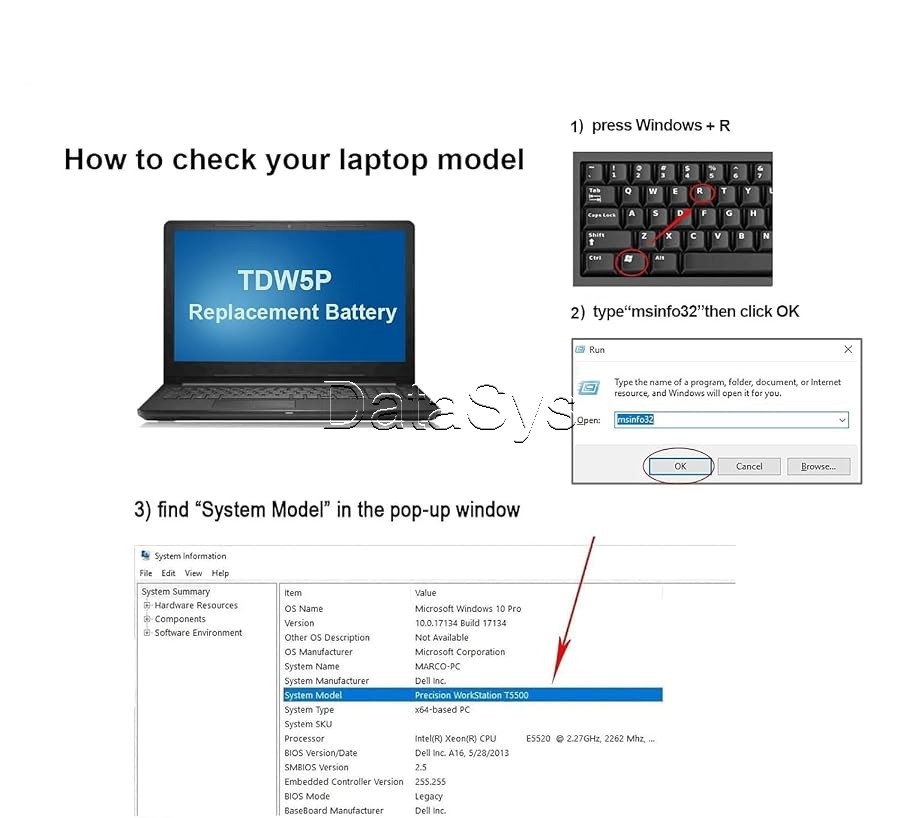
How to choose the correct battery?
Method 1: Use System Information to find your laptop model
- Step 1: Press "Windows + R" to open the Run window.
- Step 2: Type "msinfo32" in the empty box and click OK to open System Information.
- Step 3: Keep in the "System Summary" section and you will find the "System Model " item in the right pane.
Method 2: Open the back cover of the laptop and confirm the battery type and capacity, as well as the model of the laptop.
- Step 1: Shut down the laptop and unplug the interface cable (to prevent electrical shock)
- Step 2: Remove the back panel with a screwdriver. (Please handle carefully to avoid damaging the parts of the laptop)
- Step 3: Disconnect the battery and remove it. Then check the battery specifications, especially the type/part number
What’s in the box
Battery
Specifications
- SKU: DE168EA6QBWCANAFAMZ
- Product Line: DataSys
- Model: TDW5P / V9XD7 / 0V9XD7 / 4RRR3 / 04RRR3 / JFWX7 / 0JFWX7
- Production Country: USA, China
- Weight (kg): 0.9
- Certifications: Eco Friendly
- Color: Black
Verified Customer Feedback

Customers who have bought this product have not yet posted comments
Related results
Mouse pad for office useKonwei scannerMobile scannersHandheld android scannersMulti feeder scannerQuick assemble shelfAssembly shelfScanner proOBD scannerHeadlight Bulbs & AssembliesVain scannerHand scanner for securityDiagnostic scannerWall scannerInkjet color printer with scannerCopier and scannerVibration platform easy assemblyPolice scannerLaser scannersLaptop scannerRadio scannersVein scannerOffice sculptureOffice windowAssembled cloth rackOffice lockerOffice propsKW680 scannerText scannerEvaporative pad
/product/07/0222024/1.jpg?3215)
DELL TDW5P V9XD7 Battery for Alienware 13 R3 (15.2V 76Wh)
₦ 85,000
₦ 95,00011%
Questions about this product?
